
Blog · Salon Management
How We Manage Daily Salon Operations at Neo Nails
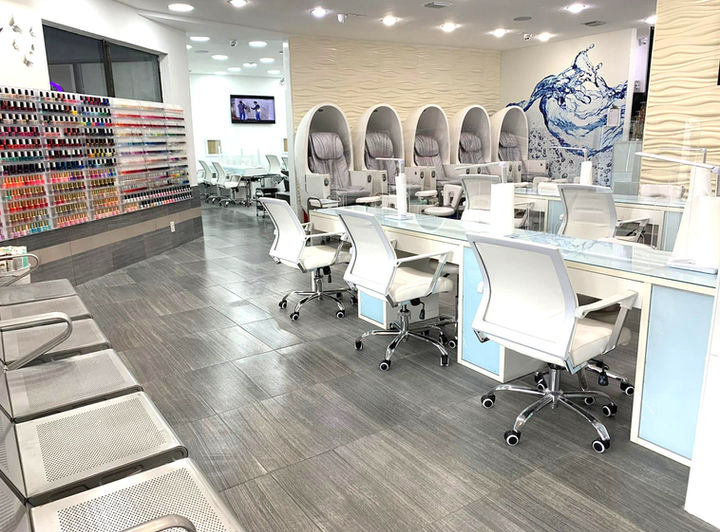
At Neo Nails, we run a busy Brickell floor: booked appointments, walk-ins, opening and closing work, and a team that still has to ask for time off, supplies, and document uploads. The appointment book gets a guest into a chair. It does not organize the rest of the workday.
This is how our team uses Fair Flow salon operations software alongside our booking system. It is an operational case study from inside the salon, not an independent review. Fair Flow was developed with real operational input from the Neo Nails team and is actively used inside the salon.
Booking software manages appointments — not the entire workday
Inside a busy salon, the calendar is essential. Guests still need a confirmed time. Our clients book the same way they always have, through the Neo Nails booking page or by calling the desk.
After that confirmation, the day still has to be run. Someone has to know who is free for the next walk-in, decide a vacation request before the week fills, notice that acetone is low, and confirm that closing sanitation actually got done. Those are staff-and-floor problems. They live next to the appointment book, not inside it.
We did not replace our booking system. We needed a place for the work that booking software is not designed to hold.
Keeping employee requests out of scattered messages
Before we centralized requests, our team asked wherever a conversation happened: a text, a hallway mention, a note at the desk. A late start and a supply run looked the same — a message someone had to remember. Managers could say yes and still lose the thread.
Salon employee request management gave those asks one Inbox. Our team submits the request by type instead of hoping the right person saw the chat.
What staff can send in one place
The Inbox is where employee requests live during the week:
- vacation requests
- late starts
- early leave
- schedule changes
- commission or payment questions
- document requests and uploads
- supply requests
- maintenance and other internal requests
A pay question stays a recorded question. It does not become payroll software.
What approval does — and does not — change
Approved vacation, late start, early leave, and schedule change can affect staff availability. That helps the person building the week see that a technician is off, coming in late, or leaving early.
Approval does not automatically rewrite published shifts or default weekly hours. If Thursday still shows a shift, a manager still has to place or remove it. Extra shift, swap shift, and break change remain manager-handled until the schedule is edited. The Inbox records the ask. The week still needs a human to publish coverage.
Managers can see status and history. Staff can open their own requests instead of asking whether anyone saw the message.
Making the walk-in rotation visible
Walk-ins are welcome at our Brickell location. They are also the fastest way for a floor to argue: paper lists get lost, names stay up after someone has a client, and two people are sure they were next.
What we needed was the numbered Available order — a salon turn tracker the team can see, not a memory the desk has to defend.
How the board moves during a service
The walk-in board we use is a staff rotation, not a client waitlist. Guests do not need to see it. Our team does.
- Staff join Available.
- Start moves a staff member to In service.
- Finish returns them to the end of Available.
- Hold preserves their position.
- Authorized managers can reorder.
- The board can be filtered by technician type.
- History records actions.
Hold keeps someone in place when they are still in the rotation but not ready for the next guest. Finish returns them to the end after a service. Reorder is the override a manager needs when the floor is not a perfect line.
The front desk still chooses service fit
Fair Flow does not currently read a walk-in’s requested service and automatically match, assign, or skip an employee. The front desk still makes the service-fit decision.
That matches how this salon actually works. A nail technician at the top of a mixed list is not the right person for a massage. Filtering the board by technician type helps the desk look at the right group. It does not choose the employee. Reception still starts the person who can do the work.
We do not treat the board as an automatic booking-to-queue. A booked appointment stays on the calendar. The rotation is for walk-ins.
Giving opening, closing and side work a clear home
Appointments do not sanitize a station. They do not restock cotton, empty the pedicure area, or close the rooms in the back. Opening and closing are recurring responsibilities, and side work is how a luxury floor stays clean between guests.
When those jobs live in someone’s head — or on a paper checklist that only one closer sees — accountability is a conversation at closing. Our team needed a clear home for opening, closing, cleaning, and sanitation so the work is visible during the day.
We use Fair Flow to keep those recurring salon tasks in one place and to track completion. Managers can see what was finished. Staff can see what still belongs to the shift. That is a shared list, not a reminder shouted from the desk, and it is not a compliance certificate.
Keeping employee documents and licenses organized
A busy salon collects files: licenses, certifications, and the documents a manager asked someone to bring in. Those used to arrive as photos in personal threads, often without an expiration date next to the file.
Document uploads can begin through Inbox. After approval, the document is stored on the employee record. An expiration date is optional. When a date is there, managers receive an in-app reminder while 1–30 days remain.
Expired documents do not automatically lock the employee out or remove them from the schedule. The reminder is an internal heads-up for managers. It is not legal advice, and it is not a substitute for Florida licensing rules. We still have to keep licenses current. The software does not do that for us, and it does not guarantee regulatory compliance.
Connecting staff supply requests to inventory ordering
Supplies are an operations problem disguised as a hallway comment. “We’re almost out” is not an order.
Employees can submit a Supplies request with items and quantities. Approval adds those quantities to the Inventory Order. Approval does not automatically increase current stock.
A request is what the team needs. Current stock is what is on the shelf. A manager still turns the Inventory Order into what actually gets purchased.
Why we use Fair Flow alongside our booking system
Fair Flow currently works alongside the salon’s existing booking system. Clients still request a time on our site or by phone. Fair Flow focuses on internal salon operations: the Inbox, the walk-in rotation, recurring tasks, documents, and supply requests.
Fair Flow Booking is being developed. It is not a currently released production feature, and we are not running guest booking inside Fair Flow today. We do not promise automatic booking-to-queue behavior or automatic service matching. The calendar books the guest. The desk still seats the walk-in.
What changed for our team
We will not invent a percentage, a time savings, or a revenue number. What we can say is operational and specific: requests have one place; managers can see status and history; staff can see the rotation; recurring responsibilities are easier to follow; and internal information is less dependent on scattered messages.
The floor is still a floor. The desk still makes judgment calls. The difference is that the team is looking at the same requests, the same Available order, and the same task list while they do that work. If you are considering a role here, start on the careers page.
FAQ
What is salon operations software?
Salon operations software organizes the internal work of a salon — staff requests, walk-in rotation, recurring tasks, employee documents, and supply requests — around the appointment book rather than replacing it.
Can Fair Flow work alongside salon booking software?
Yes. Fair Flow currently works alongside our existing booking system. Clients still book through the same booking page they already use. Fair Flow is for internal salon operations.
How can a salon organize employee requests?
At Neo Nails, staff submit vacation, late starts, early leave, schedule changes, pay questions, documents, supplies, and maintenance through one employee Inbox instead of scattered messages. Managers can see status and history.
How does a salon keep a walk-in rotation fair?
We use a shared Available list. Staff join Available, Start moves them to In service, Finish returns them to the end, and Hold keeps their place. Authorized managers can reorder. The front desk still decides service fit. Fair Flow does not automatically match a walk-in to an employee.
Can salon software track employee license expiration dates?
Document uploads can start in Inbox and, after approval, sit on the employee record. An expiration date is optional. Managers get an in-app reminder while 1–30 days remain. An expired document does not lock the employee out or remove them from the schedule.
What happens when a staff supply request is approved?
Approval adds the requested quantities to the Inventory Order. It does not automatically increase current stock.
Visit Neo Nails
If you want a manicure, pedicure, massage, or a walk-in on the Brickell floor, come see us. Check hours and parking, or book a time with Neo Nails.
For salon owners
If you run a salon and want to see the operations side we described — requests, rotation, tasks, documents, and supply orders — learn more about Fair Flow at https://www.fairflowapp.com/.